
The printer the office actually needs.
Office printers for Brisbane businesses, from a compact A4 multifunction for a small team to an A3 machine for a busy floor. New from the leading brands or refurbished in our workshop, and looked after by the same Brisbane team once it is in.
A4 multifunction printers
Print, copy and scan in a compact machine for a small office or a team. A colour A4 multifunction covers most day to day work when nobody needs anything larger than A4.
- Colour
- Black and white
- Print, copy, scan
A3 multifunction printers
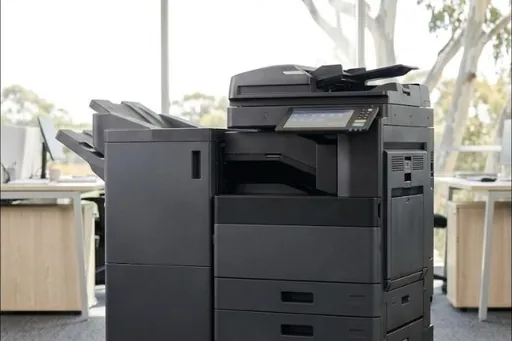
The machine most people call a photocopier: A3 and A4, faster, bigger paper trays, and finishing such as stapling and booklets. The right choice once the volume climbs or anyone needs A3.
- A3 colour
- A3 black and white
- Finishing
Refurbished office printers
A3 machines that have come off a contract, checked and serviced in our workshop before they leave us. A capable machine for less than a new one, and the quote says plainly which it is.
Photocopiers for sale in Brisbane →Rent or lease
Any of these can go on a rental or a lease instead of being bought outright, with the servicing and toner on the same arrangement.
Printer rental and leasing →Tell us how many pages the office prints a month and how much is colour, and we will come back with the printers that suit, new and refurbished, outright and monthly.
Sized to the work, not to the brochure.
A printer that is too big costs money every month. One that is too small wears out early and holds people up at the panel.
Choosing an office printer: the questions that matter
How many pages a month?
The single biggest factor. A printer run near the top of its duty wears quickly; one far above it is money tied up in speed nobody uses. Your current machine's meter, or last year's toner orders, will tell us most of what we need.
How much of it is colour?
Colour costs more per page than black and white, so a busy colour office and a mostly black and white one need different machines and different service agreements. The agreement should be priced on your real colour share, not a guess.
A3 or A4?
A3 is worth it when someone needs larger pages, plans or posters, or when the volume calls for a bigger, faster machine with bigger trays. Otherwise a good A4 multifunction does the job for less.
Laser or inkjet?
Most offices are best served by a laser or LED printer. Business inkjets from Epson and Brother have their place in lighter use, and we service those too.
Scanning and finishing
Scan to email and folders, stapling, hole punching and booklets. We set up what you need and leave out what you do not, and we can go further and file the scans for you with document management.
Running costs, not only the price on the day
Over the life of a busy office printer, toner and servicing usually cost more than the machine itself. Ask for the cost per page, black and white and colour, and compare that as well as the price of the printer.
Office printers we supply in Brisbane
Toshiba, Kyocera and HP are the three ranges we quote from most, with every current model, its speed and a printable spec sheet in our new range. We supply Canon, Ricoh, Konica Minolta, Brother, Epson, Lexmark, Sharp, Fujifilm, Xerox and OKI new to order as well, so an office standardised on one brand can stay that way.
Every office printer we sell comes with
- Delivery and installation across greater Brisbane
- Network setup, drivers, and scanning to email and folders
- Your people shown how to use it
- Removal of your old machine when you ask for it
- The option of a service agreement with toner included and freight charged on each delivery
- Toner and parts through the customer portal and our toner shop
A service agreement, or pay as you go
Most office printers we supply go onto a service agreement: servicing and repairs on one number, toner included with freight charged per delivery, and invoices built from the monthly meter readings. If you would rather pay for visits as they happen and buy toner as you need it, that works too. See managed print for how an agreement runs across a whole office.
Buy it, or pay monthly
Every printer on this page can be bought outright, rented or leased. Renting puts the printer, the servicing and the toner in one monthly figure; leasing spreads the cost over a fixed term through a finance company. The difference is set out on printer rental and leasing in Brisbane, and for the bigger machines on photocopier leasing and rental in Brisbane.
Office printers across Brisbane
We deliver, install and service office printers right across greater Brisbane from our office in Milton, from the CBD and the inner suburbs out to Moreton Bay in the north, Logan and the Redlands in the south and east, and Springfield and Ipswich in the west. Each part of Brisbane has its own page:
- The CBD and inner city
- Brisbane north and Moreton Bay
- Logan, the Redlands and Brisbane south
- Ipswich and Brisbane west
- All of Brisbane
By area of Brisbane: photocopiers and office printers for the CBD and inner city, the north side and Moreton Bay, the south side and Logan, the bayside and the Redlands and Ipswich and the west.
Common questions
Do you sell office printers in Brisbane?
Yes. New A3 and A4 multifunction printers from the leading brands, and refurbished A3 machines, delivered, installed and serviced across greater Brisbane.
What is the best office printer for a small business?
The one sized to what you print. For most small offices that is a colour A4 multifunction; once the volume climbs or anyone needs A3, an A3 multifunction makes more sense. Tell us your pages a month and we will say which.
Is a multifunction printer the same as a photocopier?
Near enough. A multifunction printer prints, copies and scans in one machine. The larger A3 ones are what most people call a photocopier.
Should we buy an A3 or an A4 printer?
Buy A3 if someone needs A3 pages or the volume calls for a bigger machine. Otherwise a good A4 multifunction does the job for less.
Do you install the printer and set up scanning?
Yes. The printer is delivered, set up on your network with the drivers installed, and scanning to email and folders is configured if you have your mail server settings.
Can we rent or lease an office printer instead of buying it?
Yes. Any of them can go on a rental or a lease, with the servicing and toner on the same arrangement. See printer rental and leasing in Brisbane.
Do you sell refurbished office printers?
Yes. Refurbished A3 machines from Toshiba, Kyocera, Ricoh, HP, Canon and Fujifilm, checked and serviced in our workshop before they leave us. Stock changes every week, so tell us what you print and we will tell you what is in.
Who services the printer after we buy it?
We do, through the same service desk: on a service agreement with toner included and freight charged on each delivery, or visit by visit if you would rather.