
Canon imageRUNNER ADVANCE multifunctions are all through Brisbane offices, alongside older imageRUNNER copiers still printing well years after their contract ended and imageCLASS machines on desks. We service all of them on site, casual or on a service agreement.
Most Canon faults we are called to in Brisbane come down to a handful of assemblies: the fixing assembly, the drum units and developing assemblies, the ITB, the paper feed, and the document feeder on top. The sections below set out what each one does when it starts to go, in the terms your panel uses.
The Canon machines we repair in Brisbane
imageRUNNER ADVANCE C5255, C5250, C5240 and C5235.
Floor standing A3 colour multifunctions. As the page counts climb, it is the film unit in the fixing assembly, the ITB and its cleaning blade, the transfer rollers and the developing assemblies we fit most.
imageRUNNER ADVANCE C5051, C5045, C5035, C5030 and C3530i.
The previous generation, still common on Brisbane office floors. The C5051 series shares many of its transfer parts with the C5200 series, which keeps these machines worth repairing.
imageRUNNER C2570, C2880, C3170, C3200 and C3880.
Older colour copiers, often long off their original contract. Drums, developers and feed rollers wear on a page count. Repairable while parts last, and we will tell you plainly when one is not worth it.
imageRUNNER 1310, 1630, 2016, 2230, 2270, 2530, 2830, 2870, 3530, 3570, 4270 and 4570.
Desktop and floor standing mono copiers. Fixing assemblies, drums and paper feed rollers are the usual wear, and the busier trays go first.
imageCLASS mono and colour laser printers and multifunctions, and MAXIFY business inkjets.
Smaller Canon machines on desks and in branches. Pickup rollers, fixing assemblies and network setup are the usual calls.
What goes wrong on a Canon, in Canon's terms
Canon's name for the fuser, built around a film unit and a pressure roller. The E001 to E009 codes. A fixing error locks the machine for safety, and it stays locked until the cause is dealt with and a technician clears it in service mode.
One drum unit per colour. Faded or streaky output, and the E012 drum drive and E061 drum current codes, usually start here.
On the imageRUNNER ADVANCE C5200 series the developing assembly is separate from the drum unit and replaced by page count. Patchy or uneven colour, and the E020, E021, E025 and E027 codes for toner density, developing motors and toner containers.
The ITB is Canon's intermediate transfer belt, with its cleaning blade and the primary and secondary transfer rollers. Blotchy solids, marks down the page, and the E074 and E075 codes when the rollers will not engage or the belt drifts to one side.
Double feeds and misfeeds from worn cassette feeding and separation rollers and multipurpose tray rollers, which Canon replaces by page count. The jam code tells us which sensor the sheet stopped at.
Originals that skew or stop in the document feeder, the E4xx feeder codes, and the E2xx and E3xx reader codes. Usually feed rollers, and a clean of the reading glass and shading plate while we are there.
Staple Finisher, Booklet Finisher and Inner Finisher faults: stapling, output tray lift, hole punch, and the E500 codes when the machine and its finisher stop talking to each other.
The E6xx and E7xx families: hard drive, image memory, firmware and communication errors, often after a power event, an interrupted update, or on an ageing drive.
Canon error codes we are called to
Quote the code on the panel when you book. It tells the technician which part of the machine to look at, and which parts to bring.
| Code | What it points to |
|---|---|
| E001 to E004 | Fixing assembly temperature and sensor errors. A safety lock: the machine stops, and a technician must clear it in service mode once the cause is fixed. |
| E009 and E014 | Fixing assembly pressure errors and fixing motor errors. |
| E012 and E061 | Drum motor, drum encoder and ITB motor errors, and drum unit current errors. |
| E020 to E027 | Developing assembly, developing motor and toner container errors, usually a developing assembly or its toner supply. |
| E074 and E075 | ITB errors: the primary transfer rollers not engaging, or the belt drifting to the front or rear. |
| E400 to E490 | Document feeder errors. Communication errors may clear with a restart; the rest need the feeder looked at. |
| E500 to E591 | Finisher errors: communication, stapler, output tray and hole punch. |
| E602 | Hard drive errors in the controller. The four digits after the dash show which part of the drive failed. |
Every Canon code family, and which ones clear with a restart
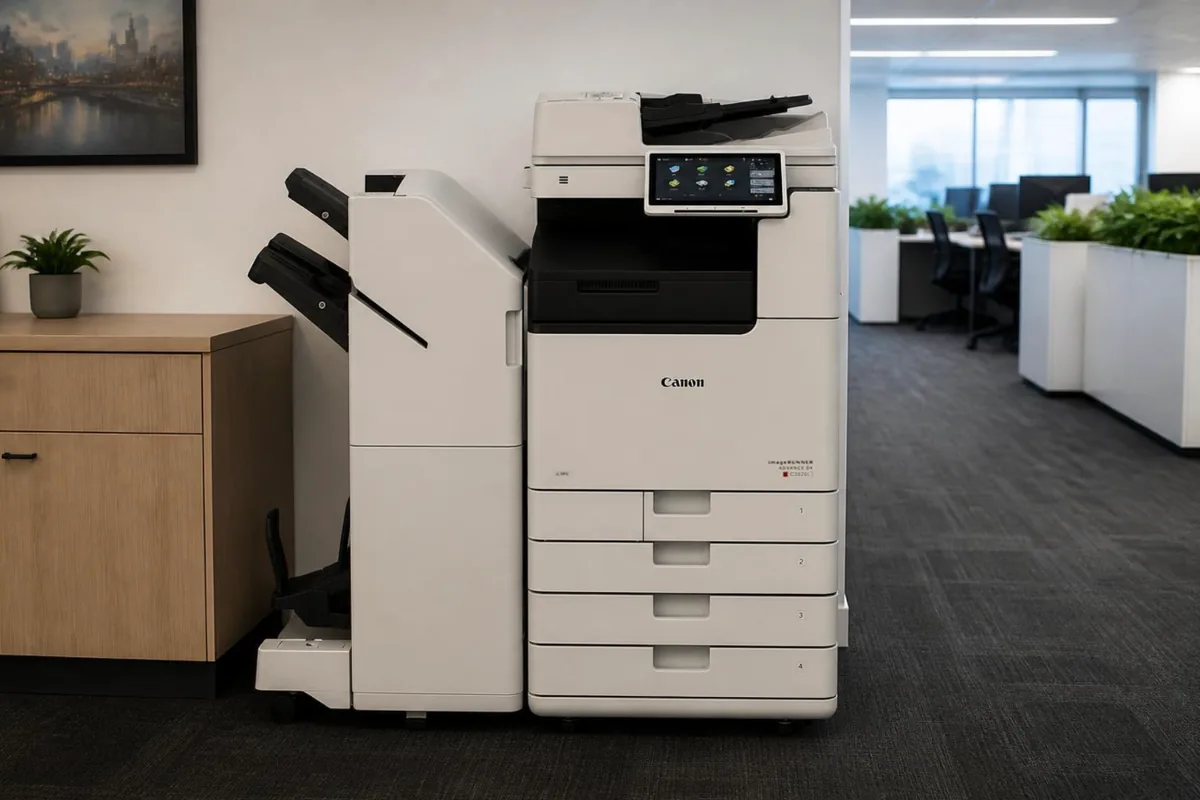
Canon imageRUNNER ADVANCE DX C3826i, one of the Canon photocopiers we repair in Brisbane.
Before you book a Canon call in Brisbane
Some safe checks first:
- Write down the complete code, detail digits and all. Some panels show E000001 rather than E001; they are the same code, so copy exactly what you see.
- Note whether the panel is showing an error code, a jam code or an alarm. Canon treats each differently, and an alarm often means the machine can keep working.
- Find the model name on the front of the machine, such as imageRUNNER ADVANCE C5250 or imageRUNNER 2530, and the serial number on its label. The model tells the technician which parts to bring.
Canon printer and copier repairs in Brisbane
Office staff call the same Canon machine a photocopier, a copier, a multifunction or just the printer, and every one of those names is fair. The imageRUNNER ADVANCE and imageRUNNER models copy, print and scan, and those with a fax board fitted send faxes too, so they are multifunction devices whatever the office calls them. When people say Canon printer they more often mean an imageCLASS model or a MAXIFY business inkjet on a desk, though plenty of imageCLASS machines scan and copy as well.
None of that changes how the job is booked. Copier repairs and printer repairs go to one service desk, which needs the model name and whatever the screen is showing. The names matter more once the technician has the covers off. A big imageRUNNER ADVANCE colour machine has a fixing assembly, four drum units, an ITB, several cassettes, a document feeder and perhaps a finisher to consider, while a desktop unit has far fewer assemblies to check.
Repair or replace your Canon photocopier?
Canon ranges move in generations. The C5200 series, from the imageRUNNER ADVANCE C5235 up to the C5255, followed the C5030 to C5051 generation, and the imageRUNNER C3200 and C3880 sit further back again. Age alone is not the test. What matters is whether parts are still available for that generation, and whether the fault is a wear part or something deeper inside the machine.
When replacement is the better answer, we supply new copiers and refurbished and renewed machines in Brisbane as well, and install them. A new or refurbished Canon can be bought outright through photocopiers for sale in Brisbane, or rented or leased through photocopier leasing and rental in Brisbane.
Keeping a Canon photocopier running in Brisbane
Brisbane's humid summers are hard on paper before they are hard on the machine. A ream left open in a storeroom over a wet weekend soaks up moisture, curls as it passes the fuser, and jams at the exit or double feeds from the tray. Keep paper sealed in its wrapper until it goes in the drawer, and load only what the office will use in a day or two.
- Clean the platen glass and the narrow strip of reading glass beside it with a soft dry cloth. Any spot on that strip turns into a line on every page sent through the document feeder.
- Give the machine its own wall socket and avoid power boards shared with heaters or kettles. E808 is the code for the machine losing the mains signal while its fixing relay is on.
- Keep the room around the machine reasonably cool and dry. Canon fits environment sensors that it relies on, and E890 is the code when a sensor stops communicating or reads out of range.
Canon service agreement or a one off repair?
With a Canon on a DSA service agreement, servicing, repairs and toner are covered by one arrangement and billed from the pages you print. Most machines email their meter readings each month. Where one does not, you get a reminder, or you can scan the sticker on the machine and enter the reading on the customer portal. Toner is included, and freight is charged on each delivery.
Brisbane is where our service desk sits and where most of our agreements run. Planned servicing in Brisbane has its own page, with what a service visit covers. Photocopier servicing in Brisbane.
Canon copier repairs, photocopier service and printer service in Brisbane
Whether you searched Canon copier repairs Brisbane, Canon photocopier service, Canon printer repair or Canon copier service near me, it is the same team: on site technicians across greater Brisbane who work on Canon machines every week, booked through one service desk with the attendance charge confirmed before anyone is sent. A breakdown is a repair call; planned servicing, cleaning and maintenance kits on their count are a service call; and an office that calls more than twice a year is usually better off with the servicing, parts and toner on one agreement. For the nearest technician to your suburb, see printer and copier repairs near me; for every brand on one page, photocopier repairs in Brisbane.
Book a Canon repair Call 1300 922 260
Where in Brisbane
We attend Canon machines on site right across Brisbane, all booked through one service desk:
- Brisbane CBD and inner city
- Brisbane north and Moreton Bay
- Logan and the Redlands
- Ipswich and Brisbane west
For planned servicing rather than a breakdown, see photocopier servicing in Brisbane. For Canon toner, parts and new machines, see our Canon page.
Outside Brisbane, Canon repairs have their own page for each city we cover: Gold Coast, Sunshine Coast, Sydney, Melbourne, Canberra, Adelaide, Perth.
How a service call works
- Tell us the faultMake, model and what the machine is doing. A photo of any error on the screen helps.
- Charge confirmedWe confirm the attendance charge when you book, before anyone is sent.
- Diagnosed on siteThe technician finds the cause and fixes what can be fixed on the visit.
- Nothing extra without a yesAny part or further work is quoted to you before it goes ahead.
Common questions
Can I clear a Canon E code myself?
Sometimes. Many reader, document feeder and controller codes clear when the machine is switched off and on at the main power switch. Fixing assembly codes such as E001 and E003 are a safety lock and stay until a technician has fixed the cause and cleared them in service mode. If a code comes back after a restart, book a call and quote the full code, including the four digits after the dash.
Do you service imageCLASS and other small Canon printers?
Yes. We service imageCLASS laser printers and multifunctions and MAXIFY business inkjets as well as the larger imageRUNNER machines, whether or not the machine came from us.
Can you service a Canon that came with a lease?
Yes, including machines that have come off a finance lease. If servicing is already included in an agreement you pay someone else for, we will tell you, rather than let you pay twice.
Is an older imageRUNNER worth repairing?
Usually, while parts are still available, because these machines were built to run for a long time. If a repair would cost more than the machine is worth to you, we will say so before any work goes ahead.
Where in Brisbane do you attend?
Right across Brisbane: the CBD and inner city, the north side and Moreton Bay, Logan and the Redlands, and Ipswich and the west, all booked through one service desk.
Are your technicians qualified?
All our technicians are trained and certified.
What do the four digits after a Canon E code mean?
They are the detail code, and they narrow the main code to an exact condition. E001-0000 and E001-0003, for example, are both fixing assembly faults but different ones. On E012 the second digit gives the colour of the drum involved, and on E602 the detail shows which part of the hard drive failed. Always quote all of it when you book.
What is the difference between a Canon error, jam and alarm code?
An error code, the E codes, means the machine found a fault and stopped the function involved. A jam code means paper stopped at a sensor and names where it came from. An alarm code means something needs attention but the machine may keep running, as with toner, waste toner, staples and punch waste. Errors usually need the most attention.
Can you look at a Canon copier in a Brisbane CBD tower?
Yes. Tell us the building, the floor and any sign in or loading dock rules when you book, and the technician comes prepared for them. Most CBD buildings only need a name and a time in advance.
Canon parts, by part number
Know the part you need? Our Canon spare parts list can be searched by part number or by model. Ask the service desk for the part on its own, or have one of our technicians fit it in Brisbane.
DSA is an independent service provider. Canon is a trademark of their owner and are used here only to describe the machines we service.