
Canberra books us for Fujifilm and Fuji Xerox more than for any brand except HP: 42 calls since 2017. The DocuCentre-IV C2263 is the model we meet most, with DocuCentre-IV C4475, C2260 and C2265, DocuCentre SC2022 and DocuPrint machines behind it, from the city and Barton to Narrabundah, Phillip and Fyshwick. The Fusing Unit, Drum Cartridges, Deve Units and the IBT Belt Unit are the usual repairs, and the chain link code on the panel tells us which before the part is shipped.
Fujifilm on our Canberra records
From our own records: the booking desk (casual calls booked, 2017 to 2025) and our service records (the machines we have serviced since 2017). Neither is the whole list.
Models we see most
- DocuCentre-IV C2263
- DocuCentre SC2022
- DocuCentre-IV C4475
- DocuCentre-IV C2260
- DocuPrint CM205
- DocuCentre-IV C2265
Where they are
- Canberra
- Narrabundah
- Stromlo
- Phillip
- Fyshwick
- Macquarie
Fujifilm is second among the brands we are booked to in Canberra, and 15 Fujifilm machines are on our service records there.
The Fujifilm machines we look after in Canberra
ApeosPort-V and DocuCentre-V C2276, C3376, C4476, C5576, C6676 and C7776, and the earlier C2275, C3375, C4475, C5575, C6675 and C7775.
DocuCentre-V C2263 and DocuCentre-V C2265.
ApeosPort-V and DocuCentre-V 2060, 3060 and 3065, and the larger 5580, 6680, 7780, 5585, 6685 and 7785.
ApeosPort-IV and DocuCentre-IV C2270, C4470, C5570, C2275, C3375, C4475 and C5575, DocuCentre-IV C2260 and C2263, ApeosPort-IV and DocuCentre-IV 3070 and 4070, and DocuCentre-IV 2060 and 3060.
The current Fujifilm Apeos multifunctions, and DocuPrint printers.
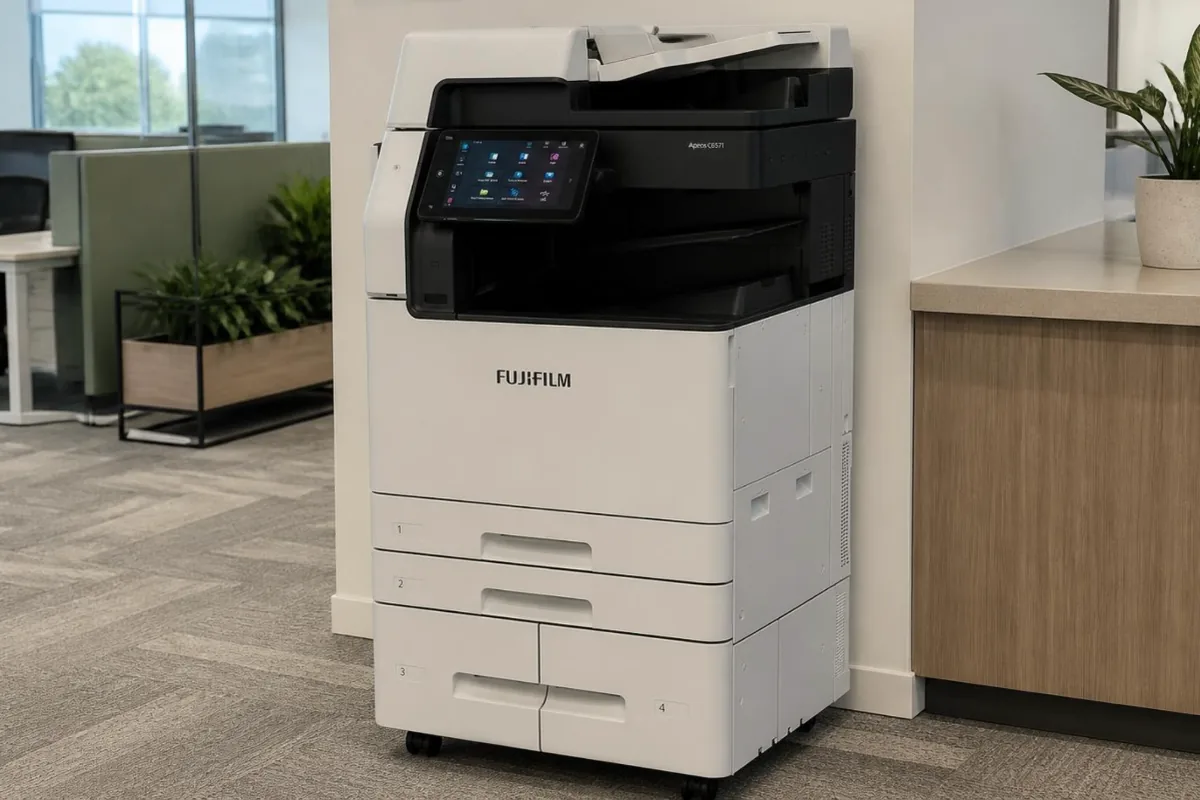
Fujifilm Apeos C6571, one of the Fujifilm photocopiers we repair in Canberra.
Fujifilm photocopier repairs in Canberra: the faults we fix
When paper from Tray 3 or Tray 4 never makes it to the registration sensor, the panel shows 073-105 or 074-105. Registration is the checkpoint where each sheet lines up before printing, so a late arrival stops the job. Try another tray. If only one tray fails, its rolls are the likely cause; if every tray fails, look further along the path.
If the feeder refuses to start and shows 005-907 or 005-908, it believes paper is still sitting on a sensor. Open the feeder cover following the panel's guidance and look for a torn corner or a sticky note. Staples, clips and glossy brochures are what usually cause that sort of damage in the first place, so put those on the glass instead.
Two finisher codes deserve a note. 047-213 means the finisher connected is not the type this machine expects, which is worth checking after a finisher has been swapped or refitted. 041-391 means the finisher reported a serious internal error; a restart often settles it, though repeats need its firmware looked at. Tell the desk what the finisher was doing at the time.
Fujifilm codes we are called to in Canberra
The panel nearly always says why a Fujifilm stopped. A few of the codes we see most, and whether a restart is worth trying:
| Code | What it points to | Restart? |
|---|---|---|
| 077-101 | A sheet stopped at the registration sensor, where paper lines up before the image is applied, and did not clear it. | Needs a technician |
| 077-123 | Paper coming back round the duplex path for its second side did not arrive at registration on time. | Needs a technician |
| 077-300, 077-301 | The front cover or the left hand cover is open, or its switch is not detecting that it has closed. | Needs a technician |
| 091-328 to 091-331 | The machine could not talk to the chip on a Drum Cartridge. Restart first, and call if the code comes back. | Worth one restart |
| 092-312 to 092-315 | ATC System Fail. A Deve Unit's toner density sensor read outside its limits for too long, so printing stopped. | Needs a technician |
| 093-916 | The chip on the black Toner Cartridge is out of place. Take the cartridge out and push it back firmly first. | Needs a technician |
Before you book a Fujifilm call
Three things that help the technician arrive with the right part:
- The billing meter, from the Machine Status button.
- Which tray is jamming, and whether the DADF on top jams as well.
- Whether a finisher message is involved, such as 047-216 or a staple fault.
Worth checking before the call:
- Note the model name on the front of the machine, for example DocuCentre-V C3375 or ApeosPort-V C4476, and whether the badge reads Fujifilm or Fuji Xerox.
- Look at the last three digits. Links from 400 to 498 are information warnings rather than faults, and links from 910 to 990 normally clear once you load paper or close a cover.
- If the panel asks for an Auditron account, check the user details with whoever manages the machine's accounts. That is an account setting, not a machine fault.
Government and secure buildings in Barton, Parkes and the city usually need visitor registration and an escort. Tell the desk who will meet the technician, and the building's entry rules, when you book.
Every Fujifilm code family, and which ones clear with a restart
Booking a Fujifilm repair in Canberra
A Canberra Fujifilm call is booked through one service team. We confirm the attendance charge, our local technician diagnoses the fault on site, and any part is shipped to your office so the job keeps moving without a second diagnosis.
Fujifilm printer and copier repairs in Canberra
Before the technician leaves after a copier repair, run the jobs your office actually does. If the Fusing Unit was replaced, print on the paper you normally use, including any card or labels. If the DADF was fixed, feed a stack of your usual originals. If the hard disk or controller was worked on, send a scan to email and one to a folder, because those settings are the ones to confirm on a Fujifilm photocopier.
Then ask what the life counters say is next. Every drum and every Deve Unit has a count of its own, as do the transfer belt and roll, and printer maintenance fits them on a planned visit before they start marking pages. Regular printer service also looks after the feed rolls in your busiest tray, on a desktop Fujifilm printer as much as on a multifunction. If the same code comes back after a repair, say so when you book, so the technician looks for the cause and not only the part.
Repair or replace your Fujifilm photocopier?
When a lease or rental on a Fujifilm or Fuji Xerox machine ends, the copier often still has plenty of working life left. Before returning or replacing it, check what the paperwork says about ownership and return. If it stays with you, it can be serviced on casual calls or put on a service agreement, provided it is in good order when the technician inspects it.
When replacement is the better answer, new machines are on our new copiers page, delivered and set up in Canberra.
Keeping a Fujifilm photocopier running in Canberra
Canberra offices often run large, tightly managed fleets with security settings on every device. A Fujifilm that has had firmware or network settings changed by an IT update can stop scanning to email or folders overnight. Note any recent IT change when you book, because it points straight at the cause.
- Remove staples, clips and sticky notes before originals go into the DADF. Torn, glossy or very thin originals belong on the glass, where they cannot damage the feed rolls.
- Ask before moving the machine, even across the room. Jolts over doorways and into lifts can upset the scanner and paper path, and the trays, finisher and DADF need securing first.
- Keep paper in its wrapper until it goes into the tray, and store reams flat and off the floor. Damp paper curls through the Fusing Unit and causes jams and wraps.
Fujifilm service agreement or a one off repair?
A Fuji Xerox or Fujifilm machine you already own can go on an agreement if it is in good order, and the technician checks that first. Casual calls stay available for machines that seldom break down, with each call booked and charged on its own. The agreement suits offices that would rather the toner and life parts were simply taken care of.
Parts for a Canberra Fujifilm are shipped to your office ahead of the return visit, and Queanbeyan is covered the same way as Canberra. How our service agreements work.
Across Canberra
We attend Fujifilm machines anywhere around Canberra, including:
- Gungahlin
- Mitchell
- Tuggeranong
- Greenway
- Hume
- Queanbeyan
- Canberra City
- Braddon
Every area we cover is on our Canberra page. For Fujifilm toner, parts and new machines, see our Fujifilm page.
How a service call works
- Tell us the faultMake, model and what the machine is doing. A photo of any error on the screen helps.
- Charge confirmedWe confirm the attendance charge when you book, before anyone is sent.
- Diagnosed on siteThe technician finds the cause and fixes what can be fixed on the visit.
- Nothing extra without a yesAny part or further work is quoted to you before it goes ahead.
Common questions
Do you service the DocuCentre-IV C2263 in Canberra?
Yes. It is the Fujifilm model we see most in Canberra. Toner density faults, the Drum Cartridges, Deve Units and tray feed rolls are the usual work.
Is Fujifilm the same as Fuji Xerox?
Yes. Fuji Xerox became Fujifilm Business Innovation, so the same machines now carry the Fujifilm name. We service both badges, from the older DocuCentre and ApeosPort machines to the current Apeos range.
Do you cover Queanbeyan as well as Canberra?
Yes. Canberra and Queanbeyan, from the offices in the city, Barton and Parkes to the trade businesses in Fyshwick, Mitchell and Hume.
Are your technicians qualified?
All our technicians are trained and certified.
What does Lift Up Fail mean on a Fujifilm tray?
The tray tried to raise its paper stack to the feed position three times running and failed, shown as codes such as 071-210 or 073-210. Overfilled trays, a crooked ream or something lodged under the paper are common causes. Take the tray out, reload it below the fill line and push it home gently. If it fails again, the lift mechanism needs a technician.
Can I change a Fujifilm Toner Cartridge myself?
Yes. Toner Cartridges are designed for the user to replace, following the steps the panel shows. Push the new cartridge fully home, because if its chip does not sit properly the black cartridge can raise 093-916. If that happens, take the cartridge out and seat it again firmly. On a service agreement, order replacements through the customer portal.
Why has my Fujifilm stopped scanning to email in Canberra?
Most often a network or security change: a new mail server setting, a password change, or a firmware update. Tell the desk what changed recently. The technician checks the scan settings against your network as it is now.
Fujifilm repairs in other cities
Other brands we repair in Canberra
DSA is an independent service provider. Fujifilm is a trademark of its owner and is used here only to describe the machines we service.