
We have taken 20 Toshiba calls in Melbourne since 2017, and we treat it as a lead brand here as everywhere, servicing e-STUDIO machines of every age, from the current AC colour ranges to older models such as the 6520C on our records. Toshiba codes tell us a lot over the phone, C44x for the fuser, C130 for a drawer that will not lift, E7xx for the document feeder, so the right part can be shipped to your office for our local technician to fit.
Toshiba on our Melbourne records
From our own booking desk record: casual service calls booked in Melbourne, 2017 to 2025. Contract servicing comes on top.
Toshiba is level fifth among the brands we are booked to in Melbourne.
The Toshiba machines we look after in Melbourne
e-STUDIO 2515AC, e-STUDIO 3015AC, e-STUDIO 3515AC, e-STUDIO 4515AC and e-STUDIO 5015AC, and the faster e-STUDIO 5516AC, e-STUDIO 6516AC and e-STUDIO 7516AC.
e-STUDIO 2020AC, e-STUDIO 2021AC, e-STUDIO 2525AC, e-STUDIO 3025AC and e-STUDIO 3525AC.
e-STUDIO 2505AC, e-STUDIO 3005AC, e-STUDIO 3505AC, e-STUDIO 4505AC and e-STUDIO 5005AC.
e-STUDIO 2518A, e-STUDIO 3018A, e-STUDIO 3518A, e-STUDIO 4518A and e-STUDIO 5018A, and the high volume e-STUDIO 5518A, e-STUDIO 6518A, e-STUDIO 7518A and e-STUDIO 8518A.
e-STUDIO 2555C, e-STUDIO 3055C, e-STUDIO 3555C, e-STUDIO 4555C and e-STUDIO 5055C, the compact e-STUDIO 2010AC and e-STUDIO 2510AC, and the A4 e-STUDIO 400AC.
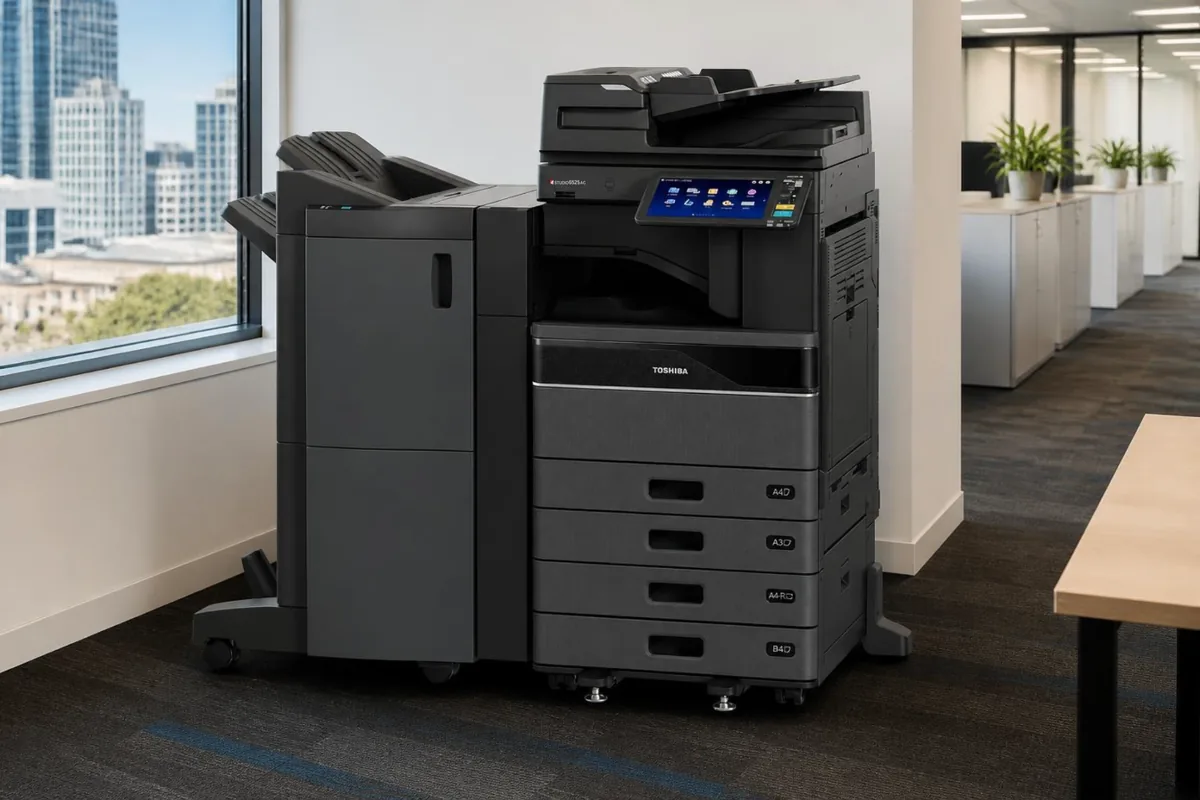
Toshiba e-STUDIO 6525AC, one of the Toshiba photocopiers we repair in Melbourne.
Toshiba photocopier repairs in Melbourne: the faults we fix
Latch the developer unit appears after the front cover has been opened, or after the machine was knocked. A developer unit is not seated or connected properly, so the machine will not print with it. Close the front cover firmly, all the way. If the message stays, do not try to push units in by hand; the technician reseats the unit and checks its connection.
Call Service with C970 means the high voltage transformer detected leakage from a main charger. The charger lays a high voltage across the drum before the laser writes the image, and toner or dust built up on its grid can let that charge escape. A restart will not cure it. Switch off and book; the technician cleans or replaces the charger parts.
Large solid areas print patchy, or every job stops and C370 appears. The transfer belt carries all four colours from the drums to the paper, so it has to turn smoothly at an even speed, and C370 means it is not moving properly. A worn belt, a tired drive or toner building up at its cleaning blade are where the technician starts.
Toshiba codes we are called to in Melbourne
Some Toshiba codes clear with one restart at the main power switch; others lock the machine until a technician has fixed the cause.
| Code | What it points to | Restart? |
|---|---|---|
| C380, C381 | The auto toner sensor in the black developer unit read above or below its limit, pointing at that developer unit. | Needs a technician |
| C970 | The high voltage transformer found leakage from a main charger. Usually the charger parts in the EPU need attention. | Needs a technician |
| C911 to C914 | The chip on a toner cartridge cannot be read. Check that colour's cartridge is pushed fully into place first. | Needs a technician |
| CD40 | The waste toner box is full. Fitting a new box and restarting may clear it; otherwise its counter needs resetting. | Needs a technician |
| C445, C446 | The fuser failed to reach ready temperature during warm up. Repeats are held as C446, which a restart will not clear. | Needs a technician |
| C449 | The fuser overheated. The machine cuts its own power and will not stay on until the fuser has cooled. | Needs a technician |
Before you book a Toshiba call
Three things that help the technician arrive with the right part:
- The full code from the corner of the panel, such as C449 or E712, not just Call Service. The letter and the digits point at different parts of the machine.
- Which drawer is jamming, if it is a jam. A PFP or LCF drawer has its own pickup and feed rollers.
- Whether anything changed first: a power cut, a move, a new paper stock. Hard drive F codes often follow a power event.
A few checks that help, or fix it outright:
- Read the code in the top right corner of the screen, including any number after an underscore, and write down what the machine was doing when it stopped.
- Read the model from the front of the machine, such as e-STUDIO 2515AC or e-STUDIO 3018A, and note the serial from its label or the ID on the DSA sticker.
- For an E061 to E065 code, check the paper size set for that drawer or the bypass tray on the panel, and change it to match the paper actually loaded.
Every Toshiba code family, and which ones clear with a restart
Booking a Toshiba repair in Melbourne
Melbourne Toshiba calls come in on (03) 8538 1600 and are booked through our service desk. The attendance charge is confirmed before anyone is sent, our local technician diagnoses the fault on site, and any part is shipped to your office for the return visit.
Toshiba printer and copier repairs in Melbourne
Not every Toshiba printer is a floor machine. The A4 e-STUDIO 400AC and e-STUDIO 339CS sit on a desk or a branch counter and serve a few people, while an e-STUDIO 5015AC or e-STUDIO 6518A stands on the floor with its drawers and a document feeder on top, often with a PFP or LCF beneath and a finisher alongside. Both are laser multifunctions inside; what surrounds the engine is what differs.
On a desk model, copier repairs tend to involve one assembly in a short paper path, often worked on where it sits. A floor photocopier needs room: the technician may pull drawers out, move the finisher away from the body or open the side covers, so clear the space around it and tell the desk if it sits in a tight alcove or behind a locked door. Because the shared machine carries more options, the code matters even more for printer repairs on the A3 than on the A4.
Repair or replace your Toshiba photocopier?
Compact and A4 models, such as the e-STUDIO 2010AC, e-STUDIO 2510AC and e-STUDIO 400AC, are built for lighter work. A major fault on one of these weighs more heavily against the value of the machine than the same fault on a floor standing 2515AC. The repair or replace sum tips sooner, and the technician tells you plainly which side of the line your machine is on.
When replacement is the better answer, new machines are on our new copiers page, delivered and set up in Melbourne.
Keeping a Toshiba photocopier running in Melbourne
Melbourne swings between dry, heated winter offices and muggy summer days, and a Toshiba feels both. Dry winter air builds static, so sheets cling together and double feed; humid days curl paper and cause exit jams. Store paper sealed and away from heaters, and fan the edges of a ream before loading it.
- Feed labels, envelopes and heavy card through the bypass tray and choose the matching paper type, so the fuser runs at the right temperature for them.
- Leave firmware to the technician. A failed update shows as F600 and needs reinstalling, and firmware loaded for the wrong model can show up as C270 in the scanner.
- Keep a spare waste toner box beside the toner. A full box halts printing as soon as the page in progress is out, so a spare saves a stalled job.
Toshiba service agreement or a one off repair?
Toner is included on an agreement and freight is charged on each delivery. The parts Toshiba schedules through its periodic maintenance message, such as fuser belts, developer material and EPU kits, are life parts fitted at their page counts on a service visit. The maintenance message then becomes part of the plan rather than a call you have to arrange and approve.
Melbourne has its own page for planned servicing. Parts for a Melbourne Toshiba are shipped to your office ahead of the return visit. Photocopier servicing in Melbourne.
Across Melbourne
We attend Toshiba machines anywhere around Melbourne, including:
- Bentleigh East
- Glen Waverley
- Mount Waverley
- Box Hill
- Ferntree Gully
- Boronia
- Croydon
- Rowville
Every area we cover is on our Melbourne page. For Toshiba toner, parts and new machines, see our Toshiba page.
For planned servicing rather than a breakdown, see photocopier servicing in Melbourne.
How a service call works
- Tell us the faultMake, model and what the machine is doing. A photo of any error on the screen helps.
- Charge confirmedWe confirm the attendance charge when you book, before anyone is sent.
- Diagnosed on siteThe technician finds the cause and fixes what can be fixed on the visit.
- Nothing extra without a yesAny part or further work is quoted to you before it goes ahead.
Common questions
Do you supply new Toshiba machines in Melbourne?
Yes. We supply new Toshiba e-STUDIO machines with a service agreement to suit, and repair the Toshibas you already have.
Why does my Toshiba say the fuser needs replacing?
The e-STUDIO keeps a count of fuser errors and of pages through the fuser. A belt or pressure roller near the end of its life shows up as creasing, toner that rubs off, or a C44x code. It is a planned part on a busy machine.
Do you have a technician in Melbourne for Toshiba?
Yes. Our local technician attends Melbourne jobs, booked through the same service desk as every DSA call, on (03) 8538 1600.
Are your technicians qualified?
All our technicians are trained and certified.
Why has scan to email stopped working on my Toshiba?
Usually because something changed on the mail side rather than in the machine. The e-STUDIO stores the mail server, port and sign in details, and these stop working when a password is reset or your provider changes its settings. Note the message on the screen. The technician updates the details in TopAccess and sends a test scan before leaving.
What is the difference between a RADF and a DSDF?
Both are document feeders that sit on top of the e-STUDIO. A RADF turns each original over to read the second side, while a DSDF is a single pass feeder that reads both sides as the sheet goes through once. The DSDF also checks for originals left behind, which shows as E762 to E777. Both use rollers that wear and need replacing.
Why does my Toshiba double feed more in a Melbourne winter?
Static. Heated offices dry the air, and dry sheets cling together and feed two at a time. Fanning the ream before loading it, and storing paper away from heaters, usually fixes it. If it carries on, the separation pad or roller is worn.
Toshiba repairs in other cities
Toshiba parts, by part number
Know the part you need? Our Toshiba spare parts list can be searched by part number or by model. Ask the service desk for the part on its own, shipped to your office, or fitted by our local technician in Melbourne.
Other brands we repair in Melbourne
DSA is an independent service provider. Toshiba is a trademark of its owner and is used here only to describe the machines we service.