
Sharp is not a brand we see often on the Sunshine Coast, which is exactly why it helps to know someone services it. The MX colour and black and white multifunctions, and the BP range that followed them, are full size office copiers with a duplex single pass document feeder on many models. We repair them on site from Caloundra to Noosa, and Sharp's codes, H2 to H7 for fusing, EE for toner density and F1 for the finisher, tell the technician where to look first.
The Sharp machines we look after on the Sunshine Coast
MX-3070N, MX-3570N and MX-4070N.
MX-3060N, MX-3560N and MX-4060N, and the MX-3050N, MX-3550N and MX-4050N.
Sharp's mono MX multifunctions.
Sharp's BP series multifunctions.
MX-FN27 inner finisher, MX-FN28 finisher, MX-FN29 saddle stitch finisher, MX-FN30 finisher, MX-DE25 to MX-DE28 paper drawers and the MX-LC17 large capacity tray.
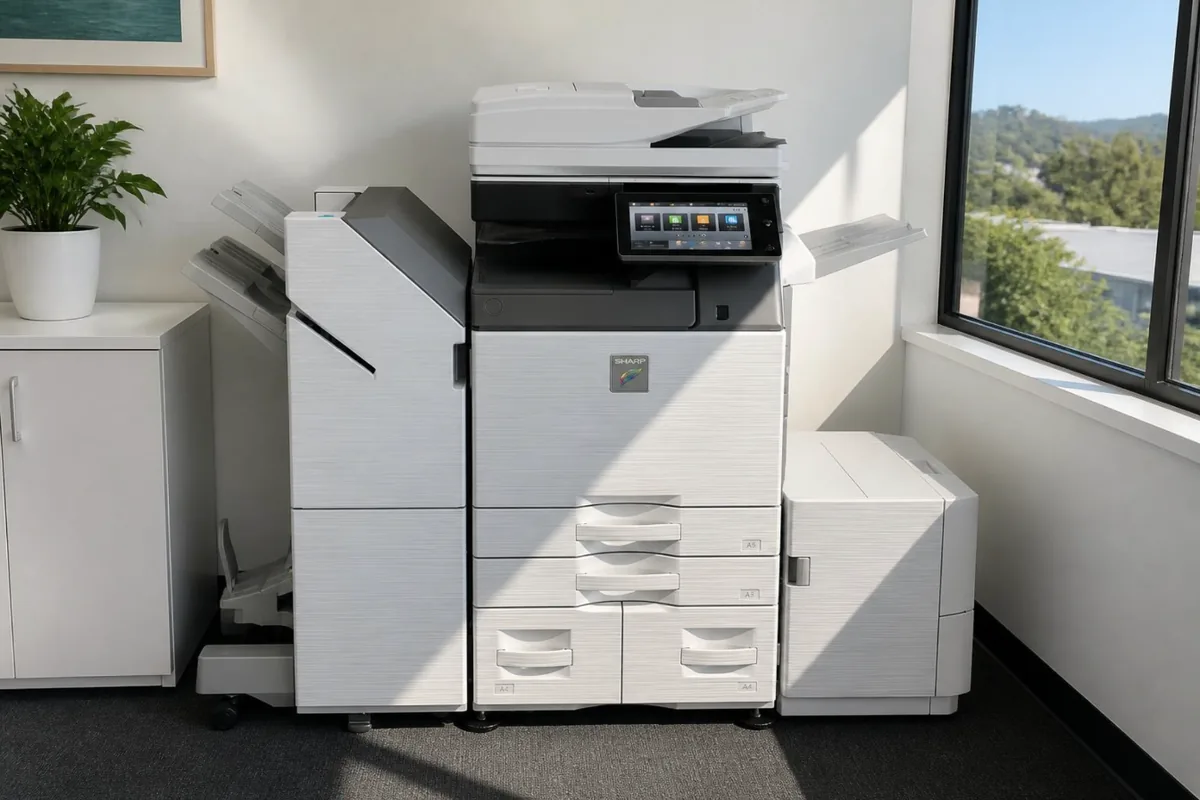
Sharp MX-4071, one of the Sharp photocopiers we repair on the Sunshine Coast.
Sharp photocopier repairs on the Sunshine Coast: the faults we fix
Colour edges that do not line up, patchy solid areas, or a mark recurring at the same spacing down the sheet often come from the transfer stage. Each colour is laid on the primary transfer belt, then moved to the paper by the secondary transfer roller. Maintenance required with TK1 means the primary transfer unit has reached its count and is due to be fitted.
A drawer that refuses to rise shows F3-12 for tray 1 or F3-22 for tray 2. Pull that tray out and look underneath for a torn piece of paper, because that alone can block the lift. Sharp keeps the code stored until the technician cancels it in simulation mode, so book the call even if you find and remove the scrap.
Duplex single pass models such as the MX-3570N read both sides of a page in one go, using a second reader inside the feeder for the back. That is why Sharp has two calibration families: E7-10, E7-11 or E7-14 for the main scanner, and E6-10, E6-11 or E6-14 for the reader in the duplex feeder. Lines on only one side point to one of them.
Sharp codes we are called to on the Sunshine Coast
A code tells the technician which part of the Sharp to look at before leaving. The ones that come up most:
| Code | What it points to | Restart? |
|---|---|---|
| EE-EL | The automatic toner density setting ended with too much toner, which mostly happens after new developer is fitted. | Needs a technician |
| F2-40, F2-41, F2-42, F2-43 | The density sensor in one developing unit has failed: F2-40 for black, F2-41 cyan, F2-42 magenta, F2-43 yellow. | Needs a technician |
| F2-64, F2-65, F2-66, F2-67 | Toner is not reaching one colour's developing unit. The toner motor, a sensor, the cartridge itself or the toner pipe may be to blame. | Needs a technician |
| F2-74, F2-75, F2-76, F2-77 | The machine was unable to read the chip fitted to one of its toner cartridges. | Needs a technician |
| C1-10 | Black main charger circuit fault, open or shorted. The charger, the wires to it, or the developing unit may be responsible. | Needs a technician |
| C4-00, C4-05 | A high voltage fault at the PTC unit, which is a part the technician can replace. | Needs a technician |
Before you book a Sharp call
Three things that help the technician arrive with the right part:
- Whether the fault is on copies only. Lines on copies only usually mean the single pass document feeder or the scanner glass.
- Which tray is jamming, and whether a large capacity tray or desk drawer is fitted.
- Whether the finisher or saddle stitch unit shows an F1 code.
Then a few safe checks of your own first:
- If Maintenance required appears with a part code such as TK1, FK1, DK or VK, note that code. It names the wear part that is due, so the right one is brought.
- For a jam, open only what the panel points to and clear the sheet following its instructions. Sharp logs each jam, so say whether it keeps happening in one place.
- Check the paper: dry, fresh from the ream, lying flat, loaded below the fill line, with the guides against the stack. For an F3 lift code, check nothing has slipped under the tray.
Many Coast businesses work from home offices, medical suites and shopfronts as well as Maroochydore and Kawana office buildings. Tell the desk where the machine is and how to reach it, and ring the local number, (07) 5327 3465.
Every Sharp code family, and which ones clear with a restart
Booking a Sharp repair on the Sunshine Coast
Sunshine Coast Sharp calls come in on our local number, (07) 5327 3465, and are booked through the same service desk as the rest of the business. We confirm the attendance charge first, and the technician diagnoses the fault where the machine stands. On the Coast we also deliver and install new and refurbished machines, and move them when an office relocates.
Sharp printer and copier repairs on the Sunshine Coast
Before booking a print quality call on a Sharp photocopier, look closely at what the page is doing. If one colour has gone pale across the whole sheet and the panel is asking for toner, the cartridge is the likely answer. Fit the new one following the guidance on screen and print a test page. That is a toner matter, not a printer repair.
It becomes a copier repair when a new cartridge changes nothing, when marks repeat at regular intervals along the page, when toner smudges under your thumb, or when the panel shows a code like F2-66, which Sharp uses when the toner feed for one colour has failed. Those point inside the machine, to the drum, the developer, the transfer belt or the fusing unit. Keep the bad page for the technician. Where your Sharp printer is a multifunction, print and copy the same document: if only the copy is marked, clean the glass first.
Repair or replace your Sharp photocopier?
The counter tells you more than the purchase date. A busy MX-4070N with a high count may need its fusing belt, primary transfer unit and developer at around the same time, which is a fair point to weigh replacement. A lightly used MX-3050N of a similar age may need nothing more than feed rollers, and repairing it is usually the sensible choice.
When replacement is the better answer, we supply new copiers and refurbished and renewed machines on the Sunshine Coast as well, and install them.
Keeping a Sharp photocopier running on the Sunshine Coast
Coastal storms and the occasional power dip are worth planning for on the Sunshine Coast. A Sharp plugged straight into a wall socket shares every surge with the kitchen and the air conditioner. Give it a surge protected outlet of its own, and if it starts slowly or loses settings after a storm, mention that when you book.
- When Check the waste toner box appears, have a new box ready. The machine carries on for now, but it stops once the box is full.
- Feed only flat, clean originals, with staples, clips and sticky notes removed. Let correction fluid dry completely first, because wet fluid smears onto the glass and rollers.
- If the panel shows U1-01, book a visit before the main board's backup battery runs flat. That battery is what keeps stored settings while the power is off.
Sharp service agreement or a one off repair?
A Sharp you already own can join an agreement if it is in good order, whether you bought it new or kept it after a lease. Servicing, repairs and toner then sit under one arrangement, toner is included with freight added per delivery, and the account follows your meter readings.
On the Coast we also deliver, install and relocate machines, so moving premises does not mean changing who services your Sharp. How our service agreements work.
Across the Sunshine Coast
We attend Sharp machines anywhere around the Sunshine Coast, including:
- Yandina
- Coolum Beach
- Peregian Springs
- Pacific Paradise
- Twin Waters
- Maroochydore
- Mooloolaba
- Alexandra Headlands
Every area we cover is on our Sunshine Coast page. For Sharp toner, parts and new machines, see our Sharp page.
How a service call works
- Tell us the faultMake, model and what the machine is doing. A photo of any error on the screen helps.
- Charge confirmedWe confirm the attendance charge when you book, before anyone is sent.
- Diagnosed on siteThe technician finds the cause and fixes what can be fixed on the visit.
- Nothing extra without a yesAny part or further work is quoted to you before it goes ahead.
Common questions
Is it hard to find Sharp service on the Sunshine Coast?
We service Sharp machines on the Coast the same way as every other brand: book through our desk on (07) 5327 3465, quote the code, and the technician comes ready for it.
Do you service the newer Sharp BP range?
Yes, as well as the MX colour and black and white multifunctions that came before it.
What if my Sharp needs a part?
It is quoted to you before it is ordered, and fitted on a return visit once it arrives, without a second diagnosis.
Are your technicians qualified?
All our technicians are trained and certified.
Can a Sharp keep printing when a colour toner runs out?
Yes, for a while. An empty colour cartridge still leaves the machine able to print in black, so documents keep coming out while you fit a new one. An empty black cartridge is different and halts printing. The low toner messages give advance warning, so keeping a spare for each colour you use heavily avoids being caught out.
Why are there lines only on the back of two sided scans?
On the MX-4070N and its duplex single pass siblings, the back of each page is read by a separate reading section built into the feeder. Lines on back sides only point there rather than at the main scanner glass. If that section fails its calibration, the panel shows an E6 code. Mention which side is affected when you book.
Why does my Sharp jam more after a wet week on the Sunshine Coast?
Damp paper. Paper that has been open in a humid room curls when it is heated and jams near the exit, or sticks and double feeds. Fresh, sealed paper usually settles it; if it does not, the rollers need a look.
Sharp repairs in other cities
Sharp parts, by part number
Know the part you need? Our Sharp spare parts list can be searched by part number or by model. Ask the service desk for the part on its own, or have one of our technicians fit it on the Sunshine Coast.
Other brands we repair on the Sunshine Coast
DSA is an independent service provider. Sharp is a trademark of its owner and is used here only to describe the machines we service.